Facebook Hacking>> Click Here | Windows Hacking>> Click Here


Subscribe For Free Updates!

We'll not spam mate! We promise.

Showing posts with label Internet Hacking Tricks. Show all posts

How To Open Banned Websites WIth Proxy Sites ?


Open Banned Websites WIth Proxy Sites
There are many sites which are blocked by government because of breaking laws of their country. The user downloads many softwares to open these sites but end up being infected by  malware, virus. Today i will share a trick with you guys which can help you easily open these banned sites without downloading anything. As you know that there are many online proxies but everyone need a proxy server which is faster and trusted. Here in this post I am revealing an online proxy and a tutorial to open banned sites with the help of these online proxies which is trusted and fast. Just follow my step to open banned sites.

http://hacks-pc.blogspot.com

 How To Open Banned Site ?

1. Open www.incloak.com in your browser.

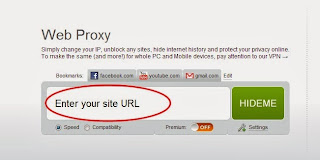
2. After that enter the URL of the site which you want to open like below.
Open Banned Websites WIth Proxy Sites
3. Now click the Hide Me button and enjoy.

How To Get Maximum Internet Speed


How To Get Maximum Internet Speed:- 

  In the previous article, which you can see here, we learned about how to speed up the internet connection using Google public DNS. In this article we will discover how to speed up the internet connection even more with several methods.
Method 1: system.ini document
Here we will use the system.ini document to speed up our connection, simply
follow these steps:
1) Go to run and type system.ini. Something like this should show:
system 1
You should know that it will probably look different on your computer,what’s important when you opened the file is that you follow the next step
2) Delete everything from the system.ini and paste the following:
page buffer=100000kbps load=100000kbps
Download=100000kbps save=100000kbps
back=100000kb
system2
Method 2: TCP OPTIMIZER
If you are using Wi-Fi then TCP optimizer will help you out and you can download it from this link. Once you have downloaded the software you will have a window like this one:
optimizer
From here on you can play with the settings to speed up your connection.
Method 3: Autobahn Accelerator
This is another program that will help improve your internet connection, it’s a small program that runs in the background and it doesn’t only help for you internet connection, it also reduces time to buffer a video. You can download it from here. After you install it, it should be already running.
Method 4: RAMRush
This is a pretty nice software which will optimize your RAM and again, improve your internet connection. You can download it from here. Once you have installed it it should look something like this:
ramrush
That’s it! Using all of these will give you maximum internet speed.

How To Check If Someone Has Hacked In Your WiFi

 How To Check If Someone Has Hacked In Your WiFi

if your internet is slower than usual, then you should check if someone has hacked in your WIFI .In this post I’m going to show you two effective way to check this.
The easiest way is by using free utility called Wireless Network Watcher v1.55 .
1) Go to nirsoft.net and download Wireless Network Watcher v1.55.
2) Install it on your pc and start scanning. It scans your wireless network and displays the list of all computers and devices that are currently connected to your network.
For every computer or device that is connected to your network, the following information is displayed: IP address, MAC address, the company that manufactured the network card, and optionally the computer name. 


If you want to check if someone has hacked in your WIFI without installing any software then you should log in your router . If anyone is connected to your network it will be shown in your router security settings. You can log into your router, usually http://192.168.1.1 . You can check your router ip address using command prompt
1) Run command prompt (cmd)
2)type ipconfig and press enter


3)ipconfig will list your ip , MAC and default gateway address. You can access to your router settings by typing default gateway address in your web browser. 


4)Log in your router and look at the Home Network -> Devices, this shows all IP addresses connected to your network.  


Try This N Comment Pls..